

|
Using this guide, you will be able to create your own forum within several minutes.
Guide contents: How to create a free forum Manual on forum creation Forum Tweaking Forum Example |
How to create a free forum
Web forum, or message board, is a class of web applications to organize communication between website visitors. This term corresponds to the initial meaning of the word «forum».
A forum offers a number of sections for discussions. Users post messages in sections and then discuss them inside those threads. As a rule a forum is divided into: Sections → threads → posts.
You can create a website that consists of a forum only, or add a forum to the existing website.
Nowadays you can download a lot of various free forum scripts, install them and enjoy your new forum. However it is not always easy, therefore you can choose another way - use one of web services, such as uCoz for example. Here all you need to do is to register.
Manual on forum creation
Let's register a free forum at uCoz step by step:

Register at uCoz.com. There is nothing complicated here: fill in the fields, select the site name and install the necessary modules. If you create forum, do not forget to install Forum module.
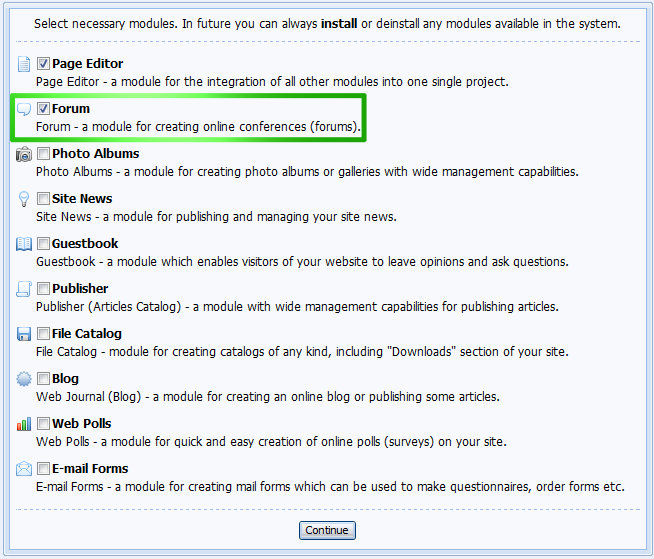
You may find detailed instructions for website registration within uCoz here.

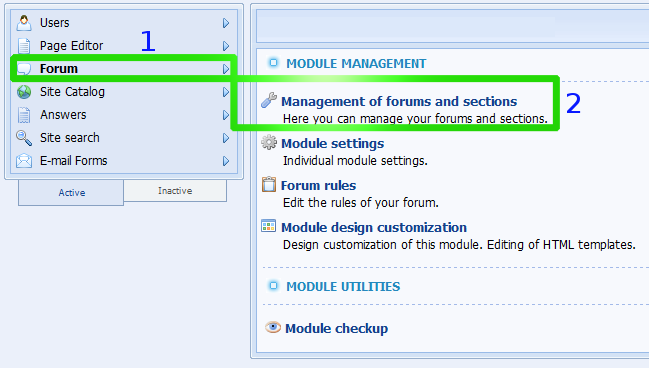
Forum has been created. The only thing that is left is to set Sections and Forums. Go to the forum settings of you Control panel. Select Management of forums and sections in the forum settings.

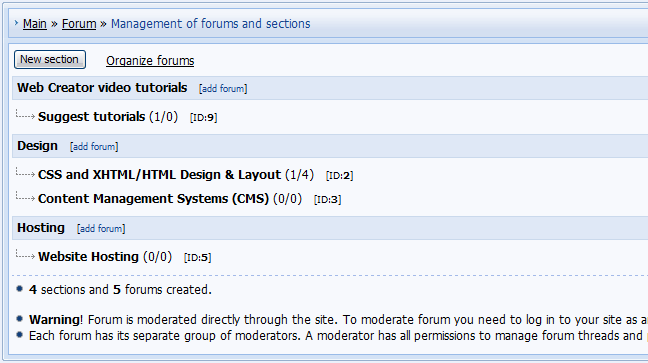
We add necessary sections and forums here.
Forum Tweaking
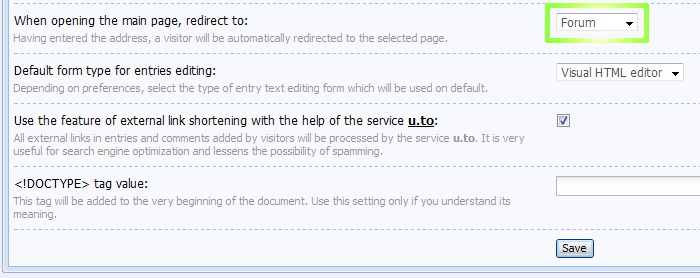
Forum is ready to be launched. We can set it up according to our needs if necessary: appoint moderators, change group permissions, give awards, gift etc. Design can be fully customized as well. We can also set forum as the main page in Common settings:
Forum Example
http://forum.ucoz.com/ - is a great example of the forum created with uCoz web-services. There are more than 12К registered users, more than 4К threads and 35К of answers. You may find help with setting your uCoz websites at this forum.
Web forum, or message board, is a class of web applications to organize communication between website visitors. This term corresponds to the initial meaning of the word «forum».
A forum offers a number of sections for discussions. Users post messages in sections and then discuss them inside those threads. As a rule a forum is divided into: Sections → threads → posts.
You can create a website that consists of a forum only, or add a forum to the existing website.
Nowadays you can download a lot of various free forum scripts, install them and enjoy your new forum. However it is not always easy, therefore you can choose another way - use one of web services, such as uCoz for example. Here all you need to do is to register.
Manual on forum creation
Let's register a free forum at uCoz step by step:
Register at uCoz.com. There is nothing complicated here: fill in the fields, select the site name and install the necessary modules. If you create forum, do not forget to install Forum module.
You may find detailed instructions for website registration within uCoz here.
Forum has been created. The only thing that is left is to set Sections and Forums. Go to the forum settings of you Control panel. Select Management of forums and sections in the forum settings.
We add necessary sections and forums here.
Forum Tweaking
Forum is ready to be launched. We can set it up according to our needs if necessary: appoint moderators, change group permissions, give awards, gift etc. Design can be fully customized as well. We can also set forum as the main page in Common settings:
Forum Example
http://forum.ucoz.com/ - is a great example of the forum created with uCoz web-services. There are more than 12К registered users, more than 4К threads and 35К of answers. You may find help with setting your uCoz websites at this forum.
VIDEO ON HOW TO CREATE A FORUM
Related articles



